How to Present a Dental Treatment Plan: 7 Clear, Patient-Friendly Tips
Posted on 1/10/2026 by WEO Media |
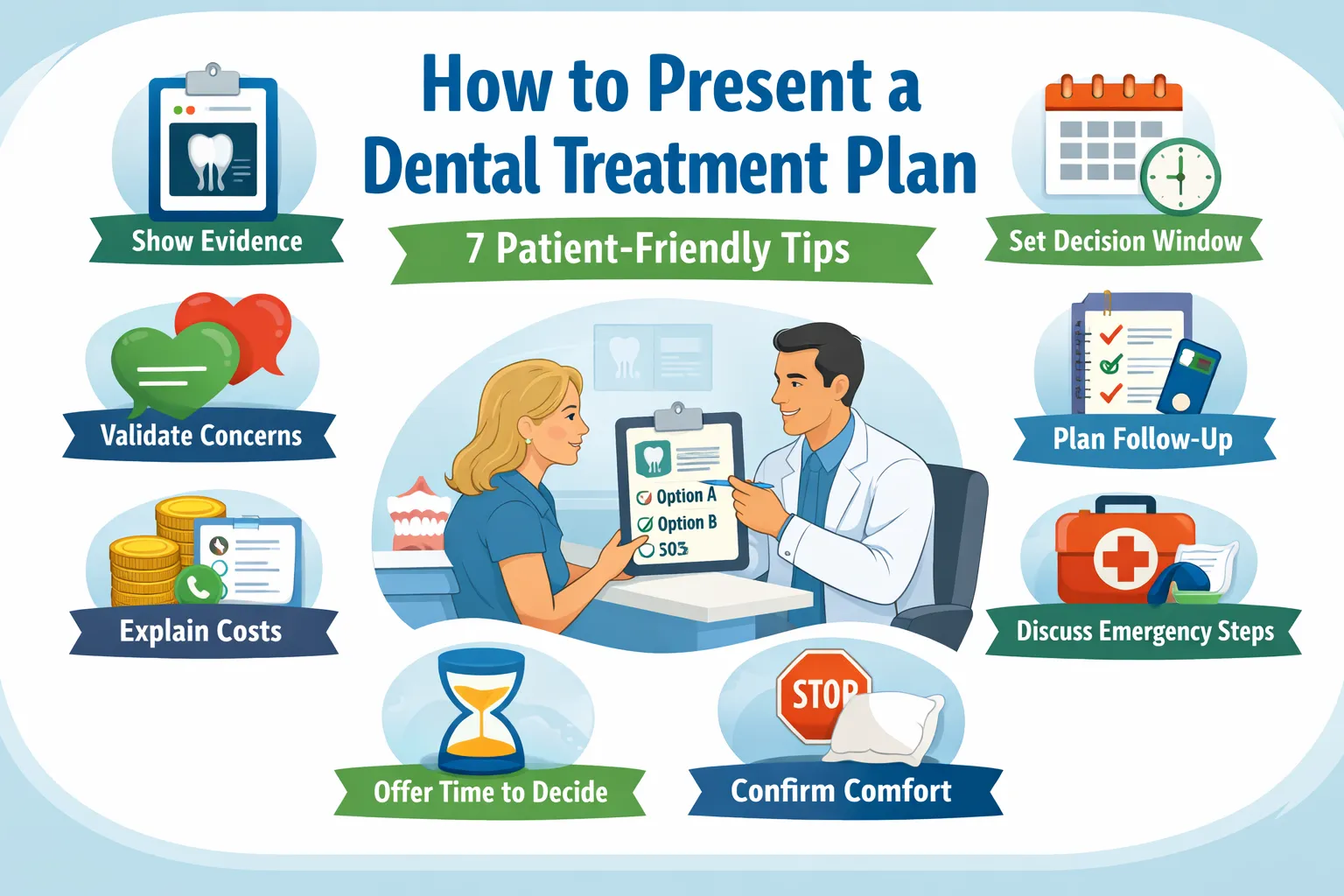 Dental treatment plan communication breaks down when patients leave with unanswered questions: “Do you believe me?” “Is this urgent?” “What will it cost?” “What if I need time?” When those questions aren’t addressed, patients delay—not from apathy, but from uncertainty. Dental treatment plan communication breaks down when patients leave with unanswered questions: “Do you believe me?” “Is this urgent?” “What will it cost?” “What if I need time?” When those questions aren’t addressed, patients delay—not from apathy, but from uncertainty.
This guide outlines a repeatable dental treatment plan presentation system dental teams can use to explain the why, options (including waiting), timing, and next steps—without sounding salesy or pressuring patients.
It’s based on common friction points we see across dental practices and grounded in established guidance and research (ADA, CDC, and dentist-patient communication literature). The goal: fewer confused callbacks, fewer stalled cases, and clearer patient follow-through.
Quick Summary + Links to Each Tip
- Tip 1: Validate symptoms and emotions — Start with trust and reduce overwhelm
- Tip 2: Make roles and routing explicit — Prevent mixed messages and misrouted questions
- Tip 3: Use a decision window — Clarify what can wait, what can’t, and what changes urgency
- Tip 4: Show evidence and name uncertainty — Explain limits and “if we find X, then Y” thresholds
- Tip 5: Explain costs and coverage clearly — Define inclusions, estimate validity, and payer-controlled variability
- Tip 6: Make follow-up predictable — Set cadence, opt-out, response times, and re-evaluation expectations
- Tip 7: Plan comfort and escalation — Use stop-and-adjust, after-hours routes, and “urgent vs expected” guidance
Who this is for and when to use it
| • |
Dentists - Diagnosis clarity, option tradeoffs, thresholds, and success definitions
|
| • |
Hygienists - Periodontal findings, stabilization priorities, and maintenance expectations
|
| • |
Treatment coordinators - Sequencing, written summaries, cost clarity, and follow-up systems
|
| • |
Front desk teams - Scheduling expectations, accurate routing, and continuity support |
These roles touch different parts of the same conversation, so consistency matters. Use these tips during new patient exams, comprehensive consults, emergency follow-ups, and any multi-visit case presentation where a clear treatment plan explanation matters most.
Hidden hesitations and “unasked questions”
Patients often have unasked questions that create friction later. In marketing literature, these are sometimes called FLUQs, meaning Friction-Inducing Latent Unasked Questions. This is not a clinical framework, but it’s a useful reminder that many barriers to follow-through are emotional and operational, not technical.
What patients are often thinking:
| • |
Believability - “Will you believe my pain if the images don’t look that bad?”
|
| • |
Judgment - “Will you judge me for my teeth, hygiene, or budget?”
|
| • |
Control - “Can I pause, split this into two talks, or take time without being pressured?”
|
| • |
Safety - “What if numbness doesn’t work, or something feels wrong after hours?”
|
| • |
Clarity - “Who do I ask so I’m not slowing everyone down?” |
Unasked questions by scenario:
| • |
Emergency visit - “If I’m not treating today, what changes the urgency tonight or this week?”
|
| • |
Periodontal diagnosis - “Is this my fault, and what can I realistically do at home?”
|
| • |
Crown or major restoration - “How many visits, what’s the downtime, and what if the temporary breaks?”
|
| • |
Implant or specialist referral - “Who owns follow-up if something hurts, and will I need duplicate imaging?”
|
| • |
Cost conversation - “Can we talk privately so I don’t feel judged?” |
How to surface unasked questions (simple script):
| • |
Normalize - “A lot of people have questions they don’t want to ask out loud.”
|
| • |
Invite one concern - “What’s the one thing you’re most worried about: pain, time, cost, or uncertainty?”
|
| • |
Offer pacing - “We can pause and come back to this. You won’t get in trouble for needing time.”
|
| • |
Confirm support - “Would it help to include a partner or caregiver, with your permission?” |
A reliable treatment plan conversation follows the same sequence every time: validate → show evidence → compare options → define a decision window → clarify costs and coverage realities → set next steps → confirm understanding.
7 Tips for Dental Treatment Plan Communication That Close More Cases
Tip 1: Validate symptoms and emotions before explaining procedures
Why it matters: Patients who feel dismissed may disengage or stop asking questions. Stress and anxiety can reduce recall, so short explanations plus written reinforcement tend to work better than long monologues.
Step-by-step:
| 1. |
Start by acknowledging symptoms and emotions without debate
|
| 2. |
Separate “symptoms” from “imaging findings” in plain language
|
| 3. |
Offer pacing control (pause, shorter discussion, follow-up conversation)
|
| 4. |
Normalize common barriers (gag reflex, sensory triggers, embarrassment)
|
| 5. |
Confirm the patient’s preferred support setup (alone or with a support person, with permission) |
Scripts:
| • |
Pain-image mismatch - “Your symptoms matter even if the image looks mild. Pain and imaging don’t always match.”
|
| • |
Overwhelm - “If this gets overwhelming, we can pause and continue later.”
|
| • |
Hygiene and shame - “We’ll focus on what helps from here forward, without blame.”
|
| • |
Sensory or gag concerns - “Gag reflex and sensory triggers are common. Planning for them is part of care.”
|
| • |
Privacy - “If you want a moment alone to ask questions, we can do that.” |
Common pitfalls:
| • |
Minimizing language - Phrases that imply symptoms are “just anxiety” or “just sensitivity”
|
| • |
Rushing the pivot - Moving to costs or scheduling before the patient feels heard
|
| • |
Overloading detail - Too many procedure facts before the goal and choices are clear
|
| • |
What to avoid saying - “It’s nothing,” “You’re fine,” “Don’t worry,” “It’s all in your head” |
What to document: Symptoms validated; patient concerns acknowledged; pacing preferences and accommodations offered.
KPIs to track:
| • |
Clarification call-backs - Fewer “I didn’t understand” calls after consults
|
| • |
First-step follow-through - Fewer no-shows for the first step in multi-visit plans
|
| • |
Clarity feedback - More patient comments that explanations felt respectful and clear |
Tip 2: Make roles, routing, and handoffs explicit
Why it matters: Patients lose confidence when they hear different wording from different team members. A clear routing rule prevents accidental clinical explanations at the front desk and keeps messaging consistent across the practice.
Step-by-step:
| 1. |
State who answers clinical questions versus coverage/payment questions
|
| 2. |
Assign a single point of contact for between-visit questions
|
| 3. |
Use one shared summary format across dentist, hygienist, and treatment coordinator
|
| 4. |
Clarify how specialist input is reconciled if it changes the plan
|
| 5. |
Confirm how guardian consent and communication permissions work when relevant |
Scripts:
| • |
Routing rule - “Clinical questions route to the clinical team; coverage and payment questions route to our financial point person.”
|
| • |
Single point of contact - “If questions come up between visits, here’s who coordinates answers and next steps.”
|
| • |
Specialist changes - “If a specialist recommends a change, we’ll reconcile it with you using the same option categories.”
|
| • |
Continuity - “If you see a different provider, your plan is still documented in the same format.” |
Common pitfalls:
| • |
Mixed terminology - “Watch it” vs “urgent” without a shared decision window
|
| • |
Misrouted clinical questions - Questions answered outside the clinical channel create confusion later
|
| • |
Unclear ownership - Patients don’t know who to call between visits
|
| • |
Unreconciled specialist changes - The plan feels like it “keeps changing” without explanation |
What to document: Roles explained; routing stated; point of contact identified; handoff plan confirmed.
KPIs to track:
| • |
Misrouted messages - Fewer clinical questions answered outside the clinical channel
|
| • |
Conflicting-plan complaints - Fewer notes like “told different things”
|
| • |
Time to resolution - Faster turnaround on between-visit questions |
Micro-vignette: A patient hears one message in hygiene and a different message at checkout. When the same one-page summary format is used across roles, “mixed messages” becomes “same goal, same plan.”
Tip 3: Use decision windows with concrete triggers
Why it matters: Vague urgency can feel like pressure. Concrete triggers feel like guidance. A decision window also protects the relationship by making it explicit that pausing is allowed.
Step-by-step:
| 1. |
Define what can wait and what should not, in general terms for this case
|
| 2. |
List “what changes urgency” triggers the patient can recognize
|
| 3. |
Offer a safe “think about it” pathway and explain re-entry steps
|
| 4. |
Offer to split the discussion if time is tight
|
| 5. |
Confirm how the choice will be documented as informed delay (deferral) when relevant |
Scripts:
| • |
Autonomy - “You can take time to think. Today is about clarity, not rushing a decision.”
|
| • |
Triggers - “Swelling, fever, bite changes, or escalating pain changes the timeline.”
|
| • |
Relationship reassurance - “Choosing to wait doesn’t change how we care for you.”
|
| • |
Time pressure - “If you’re rushed today, we can break this into two shorter discussions.” |
Concrete examples patients understand:
| • |
Watch - Stable symptoms, low concern findings, clear monitoring plan and recheck timing
|
| • |
Treat soon - Higher risk of worsening with delay, but not currently unstable
|
| • |
Treat now - Red-flag symptoms or functional changes that require timely evaluation |
Common pitfalls:
| • |
Vague warnings - “It could get worse” without naming what “worse” looks like
|
| • |
Fear framing - Leading with worst-case scenarios instead of thresholds
|
| • |
No re-entry plan - Patients don’t know how to return after deciding to wait
|
| • |
No opt-out - Follow-ups feel like chasing rather than support |
What to document: Decision window reviewed; triggers discussed; patient elected proceed/delay; informed delay (deferral) documented as applicable.
KPIs to track:
| • |
Deferred-case return rate - More patients return with questions instead of disappearing
|
| • |
Perceived pressure complaints - Fewer comments like “I felt pushed”
|
| • |
Earlier escalation - Clearer patient self-triage based on triggers |
Tip 4: Show evidence, name uncertainty, and align the conversation with informed consent
Why it matters: Patients want a case-specific “why,” not generic wording. They also want to know what might change midstream (for example, what’s found under an old filling). Clear uncertainty handling reduces distrust.
Step-by-step:
| 1. |
Show the key evidence and explain what it means in one sentence
|
| 2. |
State what the evidence cannot show yet (limits)
|
| 3. |
Compare options using the same categories every time
|
| 4. |
Name “if we find X, then Y” thresholds before starting
|
| 5. |
Confirm questions and document consent-supporting elements of the discussion |
Evidence types commonly used in dentistry:
| • |
Intraoral photos - Show cracks, wear, gum inflammation, and hygiene challenges
|
| • |
Radiographs - Show bone levels, decay patterns, and root structures, with known limits
|
| • |
Perio charting and probing - Shows pocketing and bleeding patterns over time
|
| • |
Mobility and bite evaluation - Helps explain function and risk of further breakdown
|
| • |
Sensitivity tests - Can support the symptom story, alongside other evidence |
How this supports informed consent: Informed consent is a discussion that includes the condition, proposed care, risks and benefits, alternatives (including doing nothing or waiting), and time for questions. A structured treatment plan explanation that compares options, names uncertainty, and clarifies decision windows supports this process. Many teams also aim to confirm key decisions before anything that could impair decision-making, so choices are documented while the patient can fully weigh options.
Scripts:
| • |
Evidence → meaning - “This photo and this measurement show why the tooth is vulnerable.”
|
| • |
Limits - “Imaging can’t show everything under an old restoration until we remove it.”
|
| • |
Thresholds - “If we find X, we pause and confirm whether we switch from option A to option B.”
|
| • |
Alternatives - “We can also discuss what it means to wait and monitor, including what would change the plan.” |
Common pitfalls:
| • |
Generic phrasing - Patients can’t tell if it’s about them or “everyone”
|
| • |
Skipping limits - Uncertainty feels like a surprise later
|
| • |
No thresholds - Patients fear mid-procedure decisions are made without them
|
| • |
Consent as a form - A signature without a clear discussion creates avoidable distrust |
What to document: Evidence reviewed; limitations explained; options and alternatives discussed; questions answered; key decisions confirmed.
KPIs to track:
| • |
Consent-related complaints - Fewer “I didn’t know” concerns later
|
| • |
Plan-change confusion - Fewer calls when findings change midstream
|
| • |
Option clarity - More patients selecting an option with documented tradeoffs |
Tip 5: Explain dental costs and coverage terminology in plain language
Why it matters: Cost questions can trigger shame. Clear, private, written explanations reduce confusion and help patients decide without feeling judged. Coverage decisions are made by the payer; estimates are not guarantees, and benefits can change with eligibility or remaining maximums.
Step-by-step:
| 1. |
Separate what is included from what is variable based on findings or choices
|
| 2. |
Explain estimate timeframes and what can change
|
| 3. |
Define predetermination and preauthorization and clarify they are not interchangeable terms
|
| 4. |
Provide a short glossary for common coverage terms
|
| 5. |
Confirm privacy preferences and offer a take-home summary format |
Predetermination vs preauthorization:
| • |
Predetermination - A voluntary, plan-specific estimate of how benefits may apply before treatment; it is not a guarantee
|
| • |
Preauthorization - A process some plans require for certain procedures before they will process coverage under plan rules; it still is not a guarantee, and eligibility or remaining benefits can change
|
| • |
Not interchangeable - These terms are distinct, and using them loosely can create confusion for patients and staff |
Two patient-friendly estimate validity statements:
| • |
Statement 1 - “This is an estimate based on today’s information. Final amounts can change if benefits change or if clinical findings change.”
|
| • |
Statement 2 - “We can explain expected ranges, but the payer makes the final coverage decision when the claim is processed.” |
Insurance and benefits glossary:
| • |
Deductible - What the patient pays before certain benefits apply
|
| • |
Annual maximum - A plan’s yearly benefit limit, after which the patient is responsible
|
| • |
Waiting period - Time before certain benefits begin, depending on the plan
|
| • |
Frequency limitation - How often a benefit is allowed (for example, exams or cleanings)
|
| • |
Downgraded benefit - Coverage based on a less expensive material even if a different one is used
|
| • |
Missing tooth clause - Some plans limit benefits for replacement of teeth missing before coverage started
|
| • |
In-network vs out-of-network - Whether a provider has contracted fees with the payer
|
| • |
EOB - Explanation of Benefits, the payer’s statement of how a claim was processed
|
| • |
Coordination of benefits - How coverage works when more than one plan is involved |
Payment timing options (neutral language):
| • |
Pay-in-full - Payment at the time of service or before a planned sequence begins
|
| • |
Pay-per-visit - Payment at each step as treatment progresses
|
| • |
Deposits - A deposit for lab-driven or multi-visit steps where applicable
|
| • |
Phased care - A staged sequence that prioritizes stabilization first, then restoration, then elective optimization (case-dependent)
|
| • |
Financing where offered - Third-party or in-house arrangements vary by practice policy and patient eligibility |
Common pitfalls:
| • |
Implying certainty - Saying coverage is “approved” without explaining payer-controlled variability
|
| • |
Skipping inclusions - Patients later feel surprised by what was or wasn’t included
|
| • |
Public cost discussions - Cost conversations should be private and stigma-free
|
| • |
Jargon-only explanations - Terms like “downgrade” or “annual max” need plain-language definitions |
What to document: Written estimate provided; inclusions and variables reviewed; payer-controlled coverage explained; privacy preference recorded.
KPIs to track:
| • |
Estimate confusion calls - Fewer calls about what was included or why amounts changed
|
| • |
Respect and privacy feedback - More patient comments that costs were explained respectfully
|
| • |
Phased-plan completion - Better completion when patients stage care safely |
Tip 6: Make follow-up and re-evaluation predictable
Why it matters: Many patients delay because they fear pressure follow-ups or don’t know what happens if they wait. A clear cadence with opt-out options protects autonomy and reduces drop-off.
Step-by-step:
| 1. |
Offer a follow-up preference menu (“no follow-up,” “one check-in,” “Two-touch sequence”)
|
| 2. |
State communication hours and typical response windows by channel
|
| 3. |
Explain what re-evaluation may involve if time passes (case-dependent)
|
| 4. |
Clarify time-sensitive steps in multi-visit plans and the safest re-entry step if missed
|
| 5. |
Include a travel or out-of-town plan for post-visit concerns |
Follow-up cadence menu:
| • |
No follow-up - The patient will contact the office when ready
|
| • |
One check-in - One message or call within an agreed window, then stop unless requested
|
| • |
Two-touch sequence - One check-in plus one reminder, then stop unless requested
|
| • |
Opt-out - Clear wording that reminders can be stopped at any time |
Scripts:
| • |
Opt-out clarity - “If you want time, here’s how we’ll follow up, and how to opt out.”
|
| • |
Response expectations - “Here are typical response windows during communication hours.”
|
| • |
Re-evaluation - “If time passes, we may need to recheck symptoms and update imaging based on changes.”
|
| • |
Travel plan - “If you’re out of town and something feels wrong, here’s how to reach us and what information we’ll need.”
|
| • |
Recap request - “We can provide a written recap so you don’t have to remember everything.” |
Common pitfalls:
| • |
Unannounced follow-ups - Repeated calls without a stated plan feel like pressure
|
| • |
No re-evaluation expectations - Patients expect the original plan to be unchanged months later
|
| • |
Unclear response times - Patients don’t know whether to wait or escalate
|
| • |
Missed-step ambiguity - Patients don’t know what happens if a time-sensitive visit is missed |
What to document: Follow-up preference recorded; opt-out method provided; channel preference confirmed; re-evaluation expectations discussed.
KPIs to track:
| • |
Deferred-case conversion - More planned returns after “I need time”
|
| • |
Reminder complaints - Fewer reports of follow-ups feeling pushy
|
| • |
Missed-step recovery - Faster re-entry scheduling for time-sensitive follow-ups |
Tip 7: Plan comfort and escalation pathways from day one
Why it matters: Patients often agree to care but worry about pain control, numbness fading, swelling, or “what if something feels wrong at night.” Clear escalation guidance reduces fear and improves follow-through.
Step-by-step:
| 1. |
Confirm comfort preferences and a stop signal before starting
|
| 2. |
Explain a stop-and-adjust protocol if numbness fades or discomfort rises
|
| 3. |
Give “typical vs urgent” guidance in plain language for the procedure category
|
| 4. |
Clarify after-hours contact routing and what constitutes urgent symptoms
|
| 5. |
If sedation is being considered, confirm key decisions and questions before anything that could impair decision-making |
Scripts:
| • |
Stop-and-adjust - “If numbness fades or discomfort rises, we pause, reassess, and adjust before continuing.”
|
| • |
Jaw soreness - “If your jaw joint or muscles feel sore after being open, let us know so we can adjust the plan.”
|
| • |
Urgent symptoms - “If swelling increases, fever develops, or pain escalates quickly, contact us promptly.”
|
| • |
Safety questions - “If you have questions about infection prevention and safety steps, we can walk through what we do and why.” |
What to do now vs next business day (general guidance):
| • |
Contact the office now - Worsening pain, swelling that is increasing, bite that suddenly feels “high,” or concerns that are escalating quickly
|
| • |
Use after-hours routing - If symptoms worsen outside normal hours and the practice provides an emergency contact pathway
|
| • |
Seek emergency medical care now - Difficulty breathing or swallowing, or any rapidly worsening condition that feels unsafe to wait for a callback |
Typical vs urgent triggers by procedure category (general examples):
| • |
Restorative visits - Typical: short-term sensitivity; Urgent: bite feels high, pain worsens after the initial expected window
|
| • |
Surgical visits - Typical: swelling and soreness in the expected range; Urgent: rapidly increasing swelling, fever, difficulty swallowing or breathing
|
| • |
Periodontal therapy - Typical: tenderness and mild bleeding early; Urgent: worsening swelling, uncontrolled bleeding, severe pain not responding to guidance
|
| • |
Temporary phases - Typical: mild sensitivity; Urgent: temporary breaks, repeated loosening, or sharp edges causing injury |
Common pitfalls:
| • |
No stop signal - Patients endure discomfort because they don’t know how to pause
|
| • |
Vague after-hours guidance - “Call if needed” without thresholds causes uncertainty
|
| • |
Overpromising comfort - Avoid absolute claims; keep expectations realistic
|
| • |
Unanswered safety concerns - Patients may delay if they don’t understand safety steps or what to expect afterward |
When patients ask about infection prevention, teams can summarize their protocols in plain language and, when helpful, reference CDC’s “Basic Expectations for Safe Care” as a baseline framework for dental settings.
What to document: Comfort plan chosen; stop signal confirmed; escalation triggers provided; after-hours routing discussed; sedation discussion timing noted if applicable.
KPIs to track:
| • |
After-hours confusion - Fewer unclear messages like “Is this normal?”
|
| • |
Earlier escalation when needed - Clearer thresholds for contacting the office promptly
|
| • |
Comfort-related cancellations - Fewer cancellations driven by fear of pain or loss of control |
What a written dental treatment plan should include
A one-page written summary helps patients review information at home and reduces misunderstandings. Visual reinforcement and plain language are also supported by dental communication literature as practical tools for improving understanding and informed decision-making.
Suggested one-page summary template (copy structure):
| • |
Diagnosis - “The main problem is…”
|
| • |
What we saw - Key photos, radiographs, or measurements and one-sentence meaning
|
| • |
What this does not show yet - Known limits and what could change later
|
| • |
Options - Option A / Option B / Option C (same categories each time)
|
| • |
Decision window - What can wait, what shouldn’t, and what changes urgency
|
| • |
Cost clarity - What’s included, what’s variable, and payer-controlled coverage note
|
| • |
Comfort plan - Stop signal, pacing preferences, accommodations
|
| • |
Next steps - Who contacts whom, when, and what the next appointment involves
|
| • |
After-hours and urgent signs - Typical vs urgent symptoms and where to route concerns
|
| • |
Maintenance - Hygiene intervals, recall schedule, protective recommendations when indicated |
Questions patients and caregivers can ask about a dental treatment plan
This section mirrors common patient search intent and can be used as a take-home prompt list.
| • |
What problem are we solving? - “What’s the diagnosis in plain language?”
|
| • |
What happens if I wait? - “What might get harder, riskier, or more expensive if I delay?”
|
| • |
What are my options? - “What are the main tradeoffs between option A and option B?”
|
| • |
What would change the plan? - “If you find something different mid-visit, what decisions might I need to make?”
|
| • |
How many visits? - “How many appointments are typical, and what happens at each step?”
|
| • |
What should I expect after? - “What’s typical vs urgent afterward, and who do I contact?”
|
| • |
What does success mean? - “How will we know the plan worked for comfort and function?”
|
| • |
What is included in the estimate? - “What is included, what is variable, and how long is this estimate likely to stay current?”
|
| • |
How does coverage work? - “Is this predetermination or preauthorization, and what does that mean?”
|
| • |
Can I get a recap? - “Can I receive the plan in writing so I can review it at home?” |
How long treatment plans and estimates stay current
Validity is case-dependent, but many practices update plans when any of these change: time passes, symptoms change, new imaging is needed, lab fees change, or benefits reset in a new coverage year. ADA guidance also emphasizes that final payer decisions depend on eligibility and plan rules at the time of service.
| • |
What commonly triggers an update - New symptoms, longer delays, new findings, or new imaging needs
|
| • |
Coverage reality - Eligibility and remaining benefits can change even after an estimate
|
| • |
Clear wording that helps - Written summaries can separate “what we know today” from “what may change later” |
Using visual aids to improve patient understanding
Visuals can reduce cognitive load and make abstract concepts concrete. Helpful aids include intraoral photos, annotated radiographs, simplified periodontal charts, and short, plain-language summaries that match what was said verbally.
Three mini-examples teams can copy:
| • |
Intraoral photo caption - “This crack line helps explain why biting feels sharp on the right side.”
|
| • |
Perio chart sentence - “These deeper pocket numbers show where inflammation is harder to clean at home.”
|
| • |
Radiograph caption - “This darker area suggests change near the tooth structure; the image helps, but it can’t show everything under a filling.” |
How to annotate without overwhelming:
| • |
One finding per image - Use a single photo or single radiograph view to answer a single question
|
| • |
Minimal markup - One circle or arrow is often enough; too many marks increases confusion
|
| • |
Caption formula - “What you’re seeing → Why it matters → What we do next”
|
| • |
Consistency - Use the same caption style across the practice so patients recognize the pattern |
Common mistakes to avoid:
| • |
No caption - Patients need a one-sentence “what you’re seeing” line
|
| • |
Visuals without choices - Show the evidence, then connect it to options and tradeoffs
|
| • |
Mismatch with verbal explanation - The written or visual recap should match what was said in the room |
Second opinions and records requests
Second opinions are a normal part of healthcare, especially for complex or multi-visit plans. A calm, standardized process helps patients compare options fairly using the same categories (goal, time, visits, risks and limits, maintenance, and what changes the plan).
What can be sent vs what can be summarized
| • |
Often sent - Relevant images when available, periodontal charting summaries, and other case-specific visuals used in the discussion
|
| • |
Often summarized - A one-page plan recap (diagnosis, evidence, limits, options, decision window, next steps)
|
| • |
Why both matter - Patients can compare evidence and also compare options in the same categories across offices |
How patients typically request records
| • |
Who to contact - A designated records contact or front office pathway that routes requests appropriately
|
| • |
Authorization - Written permission and identity verification per office policy and applicable requirements
|
| • |
Secure delivery - Portal access, encrypted delivery where appropriate, or physical copies per protocol |
Timing and expectations
| • |
Timeframes vary - Delivery speed depends on office policy, record type, and jurisdiction-specific requirements
|
| • |
Partial requests - Patients may request specific dates or specific imaging to reduce delays and cost
|
| • |
Fees and policies - Copying fees and administrative steps vary; setting expectations up front reduces frustration |
Documentation boundaries: clinical record vs financial record
For consistency and clarity, dental teams often separate clinical documentation from financial and coverage documentation. Professional guidance notes that financial information such as insurance breakdowns, claims, and payment vouchers should not be recorded in the clinical dental record and should be maintained separately.
| • |
Put this in the clinical chart - Symptoms, findings, evidence reviewed, options discussed, consent-supporting notes, instructions, and re-evaluation triggers
|
| • |
Put this in the financial or administrative record - Estimates, benefit breakdowns, payer communications, predeterminations, claim details, and payment arrangements
|
| • |
Why it matters - Cleaner routing, clearer auditing, and fewer mixed messages about what is “clinical” versus “coverage-related” |
Teach-back prompts for dentistry
Teach-back is supportive, not a test. It checks how well we explained it, not how smart the patient is.
When to use teach-back
| • |
End of the consult - After options are compared and the decision window is clear
|
| • |
Before scheduling - To confirm the patient understands the next step and purpose of the visit
|
| • |
After the cost recap - To confirm what is known today versus what could change later
|
| • |
Before sending the recap - To make sure the written summary matches what the patient heard |
Teach-back prompts
| • |
Diagnosis check - “In your own words, what problem are we trying to solve?”
|
| • |
Options check - “What are the options we discussed, and what’s the main tradeoff between them?”
|
| • |
Timeline check - “What do you expect the next step to be, and when?”
|
| • |
Safety check - “What would make you contact us sooner rather than later?”
|
| • |
Permission to simplify - “Which part should we simplify first: the why, the options, or the next steps?” |
Common mistakes
| • |
Sounding like a quiz - Teach-back should feel supportive, not evaluative
|
| • |
Asking only “Do you understand?” - A yes may mean “I’m overwhelmed,” not “I’m clear”
|
| • |
Skipping the recap - Teach-back works best when paired with a written summary |
Accessibility and language support
Patients may need different formats or accommodations to fully understand the plan. Building this into the process improves clarity and reduces avoidable delays, based on clinic capacity and applicable requirements.
| • |
Interpretation and translation - Translated summaries or interpreter support where available and applicable
|
| • |
Hearing and vision needs - Large print, captions on videos, and face-to-face positioning for lip-reading
|
| • |
Low-tech alternatives - Printed summaries for patients who do not use portals
|
| • |
Shared-phone privacy - Discreet communication options when a phone is shared
|
| • |
Neurodivergence and anxiety support - Clear pacing, step-by-step explanations, and predictable stop signals |
Intake checklist for clarity:
| • |
Preferred language - Language and format preference (print, portal, email where appropriate)
|
| • |
Hearing or vision needs - Any accommodations to document for future visits
|
| • |
Communication preferences - Best channel and consent preferences for reminders
|
| • |
Portal access - Whether the patient uses the portal or needs low-tech alternatives
|
| • |
Support person preference - Whether a support person will join discussions (with permission) |
Informed refusal and documenting declined treatment
Sometimes a patient chooses not to proceed. Informed consent guidance includes documenting when consent is not granted, often referred to as informed refusal (declined). The goal is clarity and continuity, not punishment.
Charting lines teams can adapt:
| • |
Refusal documented - “Options, risks, benefits, and alternatives (including no treatment) discussed; patient declined today.”
|
| • |
Reason noted - “Patient preference and constraints reviewed; patient chose to defer; re-evaluation triggers discussed.”
|
| • |
Decision window - “Decision window reviewed; patient advised to contact the office sooner if red-flag symptoms occur.”
|
| • |
Written recap offered - “Written summary provided or offered; questions answered.”
|
| • |
Follow-up preference - “Follow-up preference and opt-out documented.” |
Charting snippets: copy-ready documentation lines
| • |
Tip 1 - “Symptoms validated; concerns acknowledged; pacing and accommodations reviewed.”
|
| • |
Tip 2 - “Roles explained; clinical vs coverage/payment routing reviewed; point of contact identified.”
|
| • |
Tip 3 - “Decision window reviewed; triggers discussed; patient elected proceed/delay; informed delay (deferral) documented as applicable.”
|
| • |
Tip 4 - “Evidence reviewed; limitations explained; options/alternatives discussed; questions answered; key decisions confirmed.”
|
| • |
Tip 5 - “Written estimate provided; inclusions/variables reviewed; payer-controlled coverage explained; privacy preference noted.”
|
| • |
Tip 6 - “Follow-up cadence and opt-out explained; channel preference recorded; re-evaluation expectations discussed; recap provided or offered.”
|
| • |
Tip 7 - “Comfort plan selected; stop signal confirmed; escalation triggers and after-hours routing discussed; sedation discussion timing noted if applicable.”
|
| • |
Teach-back - “Teach-back performed; patient summarized diagnosis/options/next step accurately (or clarified and rechecked).” |
Implementation: Make this a repeatable system
| 1. |
Audit recent cases for missing unasked questions (validation, decision window, cost clarity, next steps, escalation)
|
| 2. |
Standardize a one-page recap format (diagnosis, evidence, limits, options, decision window, costs/coverage note, next steps, escalation)
|
| 3. |
Align the handoff flow and write routing scripts for clinical vs coverage/payment questions
|
| 4. |
Practice language for tough moments (pain-image mismatch, overwhelm, privacy requests, coverage changes)
|
| 5. |
Standardize documentation using the charting snippets and teach-back prompts
|
| 6. |
Review policy categories for clarity and align with local requirements and counsel as needed
|
| 7. |
Track clarity signals over time (clarification call-backs, missed steps, patient feedback on explanation clarity) |
Conclusion: a clear plan is a complete plan
A strong treatment plan explanation feels complete when patients can answer: what’s happening, why it matters, what choices exist, what can wait, what happens next, and what to do if something changes.
| • |
Validate first - Patients engage when they feel believed
|
| • |
Route clearly - The right person answers the right question
|
| • |
Use decision windows - Concrete triggers beat vague urgency
|
| • |
Name limits and thresholds - Uncertainty becomes a plan, not a surprise
|
| • |
Explain costs and coverage terms - Written clarity reduces shame and confusion
|
| • |
Make follow-up predictable - Cadence, opt-out, response expectations, and re-evaluation clarity
|
| • |
Plan comfort and escalation - Stop signals and clear “urgent vs expected” guidance |
About the author and editorial review
Written by senior experts at WEO Media - Dental Marketing, with a focus on reducing patient decision friction and improving communication workflows and practice operations that support clear, respectful care discussions. This article was editorially reviewed for clarity, accuracy, and practical applicability, and is intended for educational purposes—not as medical, dental, or legal advice or as a substitute for individualized clinical judgment.
FAQs
How can a dental team explain a treatment plan without sounding salesy?
Use a consistent structure: validate concerns, show the key evidence, compare 2-3 options using the same categories, define a decision window with concrete triggers, clarify costs and coverage realities in writing, and confirm understanding with teach-back.
What is the difference between predetermination and preauthorization in dentistry?
Predetermination is typically a voluntary estimate of how benefits may apply before treatment. Preauthorization is a process some plans require for certain procedures before they will process coverage under plan rules. These terms are not interchangeable, and neither is a guarantee of final payment.
How do we document when a patient declines treatment?
Documentation commonly includes the options reviewed, risks and benefits, alternatives including waiting or no treatment, patient questions answered, and the patient’s decision. Many practices also document a decision window, re-evaluation triggers, and the patient’s follow-up preference or opt-out choice.
How long are treatment plans and estimates valid?
Validity is case-dependent. Plans and estimates may need updating when time passes, symptoms change, new imaging is needed, lab fees change, or coverage/benefits shift. A clear written summary can separate what is known today from what may change later.
What should be in a written treatment plan summary?
A strong summary includes the diagnosis in plain language, key evidence and its limits, options compared using consistent categories, a decision window with urgency triggers, cost inclusions and variables with payer-controlled coverage language, next steps, and typical versus urgent symptoms with contact routes. |
|





