Google Business Profile Posts for Dentists: What to Post (Examples + Templates)
Posted on 1/8/2026 by WEO Media |
 Post the content that answers patients’ unspoken questions before they call. When someone searches “dentist near me,” they’re often anxious, short on time, and comparing listings to decide which office feels safe to contact. Google Business Profile posts (often called Google Posts; here, “GBP posts”) shape that decision in the search results—especially on Google Maps and in the local pack—where patients scan for reassurance and clarity. Post the content that answers patients’ unspoken questions before they call. When someone searches “dentist near me,” they’re often anxious, short on time, and comparing listings to decide which office feels safe to contact. Google Business Profile posts (often called Google Posts; here, “GBP posts”) shape that decision in the search results—especially on Google Maps and in the local pack—where patients scan for reassurance and clarity.
The challenge most offices face: knowing what to post. Without a system, GBP posts become sporadic, generic, or promotional in ways that raise skepticism rather than reduce it. This guide gives you a repeatable framework with ready-to-use templates so posting becomes a calm, consistent habit rather than a creative burden.
Already posting regularly but not seeing results? Skip to the 7-step framework to audit your approach.
Below, you’ll find copy-and-paste templates for Updates, Offers, and Events, a field-by-field optimization guide for each post type, a 7-step writing framework that reduces hesitation, and measurement logic to track what’s working—all designed to help you post with confidence and consistency.
Written for: dental practice owners, office managers, and marketing teams who want clear guidance on what to post to their Google Business Profile—with examples they can customize and use immediately.
TL;DR
If you only remember five things from this guide:
| • |
Post one intent per post — avoid “we do everything” posts that dilute the message
|
| • |
Lead with reassurance, not promotion — answer “what happens next?” before patients have to ask
|
| • |
Match the post type to the content — Updates for education, Offers for precise promotions, Events for real date/time items
|
| • |
Use templates to stay consistent — copy/paste examples reduce creative friction and compliance risk
|
| • |
Post weekly, review monthly — freshness signals reliability; reviews catch operational drift |
Table of Contents
What Are Google Business Profile Posts?
Google Business Profile posts are short updates published directly to a dental office’s Google listing. Posts can appear in branded searches and on Google Maps, sometimes alongside other listing details in the local pack. The interface can change over time, but GBP posts typically combine media, short text, and either an action button (Updates and Events) or an offer detail experience (Offers).
GBP posts are one component of a complete profile. For guidance on optimizing your GBP categories and other listing fundamentals—including building review velocity—start there before focusing on post content.
What makes a GBP post effective: posts work best when they answer the patient’s “what happens next?” question with calm, accurate expectations. The goal is not to impress—it’s to reduce the hesitation that keeps anxious patients from calling.
Posting safety note: Avoid typing phone numbers into GBP post descriptions. Use the profile phone field and the Call now button instead. This can reduce rejection risk and keeps call routing consistent with the listing.
> Back to Table of Contents
Update vs Offer vs Event: When to Use Each
Choosing the right post type is an accuracy decision, not just a marketing decision. Each post type serves a different purpose and has different fields available.
| • |
Use Updates — education, reassurance, symptom clarity, what-to-expect, service explanations, and operational clarity. Updates are the default choice for most dental offices because they are the simplest way to set expectations and match patient intent.
|
| • |
Use Offers — a precise promotion with clear eligibility and terms, used sparingly and written to avoid pressure or guarantees. Only post an Offer if your office can honor the terms exactly as written.
|
| • |
Use Events — anything with a real date/time anchor: closures, limited office events, community days, or scheduled consult blocks. The primary risk with Events is simple: incorrect dates harm trust quickly. |
A practical rule is to treat Offers and Events as “high-accuracy” post types. If the dates, terms, or availability might change, it is safer to publish an Update instead.
> Back to Table of Contents
Update Post Templates (Copy and Paste)
These templates are designed to be clear, calm, and compliant. Replace bracketed items with your office-specific information. Avoid ALL CAPS and excessive emojis, and follow the posting safety note above.
Template 1: Emergency Symptom Clarity
Post copy: “Sudden tooth pain, swelling, or a broken tooth can be overwhelming. If you are unsure what counts as urgent, describing symptoms helps guide the next step. When you call, we’ll ask about timing, swelling, and pain level. Recommendations depend on an evaluation and findings.”
Suggested button: Call now or None
For practices focused on capturing emergency dental searches, this template addresses the most common patient anxiety: not knowing if their situation is urgent enough to call.
Template 2: Same-Day Triage Guidance
Post copy: “If you are dealing with dental pain or a broken tooth, timing matters. Calling earlier can help with triage and next-step guidance based on symptoms. Availability depends on the day’s schedule, and recommendations depend on evaluation and findings.”
Suggested button: Call now
Template 3: Broken Tooth or Crown Decision Pathway
Post copy: “A chipped or broken tooth can affect comfort and confidence. Depending on the damage, options may include smoothing, bonding, or a crown. Here’s what an evaluation typically includes and how the next step is decided. Timing depends on symptoms and findings.”
Suggested button: Book or Learn more
Template 4: New Patient Visit Expectations
Post copy: “New to [Name of Your Practice]? Many patients want to know what the first call and first visit look like. On the phone, we’ll ask what’s bringing you in and any scheduling constraints. At the visit, a typical appointment includes an exam and a plan based on priorities.”
Suggested button: Book or Learn more
This template supports your broader patient acquisition efforts by addressing what new patients actually want to know before they commit.
Template 5: Hygiene Restart
Post copy: “Preventive visits help spot small issues early and reduce surprise treatment needs later. If it has been a while, that is common—and it is still a good time to restart. We’ll explain what a typical visit includes and what questions help tailor the appointment.”
Suggested button: Book
Template 6: Implant Consult Clarity
Post copy: “Considering dental implants? A consult typically reviews bone and gum health, what you want to replace, and which options fit your goals. Plans vary by patient, so the next step is an evaluation and a clear explanation of choices.”
Suggested button: Learn more
For practices investing in implant marketing, GBP posts can support paid and organic efforts by setting realistic expectations before the consult.
Key takeaway: Update templates perform best when the office adds operational truth (scope, availability, and boundaries) to prevent mismatched expectations.
> Back to Table of Contents
Offer Post Templates (Copy and Paste)
Offers should be used sparingly and written for clarity. The Link to redeem offer, Terms, and landing page should match exactly what the office will honor.
Template 1: New Patient Offer With Readable Terms
Title: “New Patient Exam + X-Rays (New Patients)”
Description: “This offer is for new patients and includes an exam and needed X-rays. Next step is scheduling; recommendations depend on evaluation and findings. See terms for details.”
Terms (format as bullets):
| • |
Eligibility — New patients only.
|
| • |
Includes — Exam and necessary X-rays.
|
| • |
Limitations — Not valid with other offers.
|
| • |
Clinical boundary — Treatment recommendations depend on evaluation and findings.
|
| • |
Expiration — Valid through [end date]. |
Coupon code: “NEWPAT25”
Link to redeem offer: [landing page URL with matching terms and UTMs]
Template 2: Membership Plan Sign-Up
Title: “Membership Plan: Preventive Visits Included”
Description: “A membership plan can help simplify preventive care for patients without insurance. We’ll explain what is included, what is not, and how to enroll. See terms for details.”
Terms (format as bullets):
| • |
Eligibility — Varies by plan.
|
| • |
Includes — Preventive services as listed in the plan details.
|
| • |
Important note — Membership is not insurance.
|
| • |
Clinical boundary — Treatment recommendations depend on evaluation and findings.
|
| • |
Expiration — Valid through [end date]. |
Coupon code: “MEMBER”
Link to redeem offer: [membership page URL with UTMs]
Template 3: Whitening Offer Without Guarantees
Title: “Whitening Offer (Eligibility in Terms)”
Description: “Whitening results vary based on stain type and sensitivity risk. This offer applies to [whitening type] for eligible patients. See terms for eligibility and details.”
Terms (format as bullets):
| • |
Eligibility — Suitability depends on evaluation.
|
| • |
Results note — Results vary by stain type and tooth structure.
|
| • |
Limitations — As listed in the offer details.
|
| • |
Expiration — Valid through [end date]. |
Coupon code: “SMILE10”
Link to redeem offer: [whitening page URL with UTMs]
Key takeaway: Offer templates reduce disputes when the terms are readable and the destination page matches the post exactly. For guidance on building pages that support these offers, see how to create dental landing pages that convert.
> Back to Table of Contents
Event Post Templates (Copy and Paste)
Event posts work when timing is correct and the next step is explicit.
Template 1: Office Closure
Title: “Office Closed: [Holiday] ([Date])”
Description: “Our office is closed on [date]. If you are experiencing swelling, trauma, or severe pain, call and leave a message with symptoms if your office monitors voicemail so you can receive next-step guidance when available. Non-urgent appointments can be booked for the next open day.”
Suggested button: None or Learn more
Template 2: Community Day
Title: “Community Dental Day: [Time Window]”
Description: “This event is for [who it’s for]. We’ll share what is available, what to bring, and what to expect. Capacity may be limited, and recommendations depend on evaluation and findings.”
Suggested button: Learn more or Sign up
Template 3: Limited Consult Block
Title: “[Service] Consult Block: [Date]”
Description: “We are reserving consult time on [date] for patients exploring [service]. We’ll review what a consult typically includes and answer questions about next steps. Plans vary by patient and depend on evaluation.”
Suggested button: Book or Learn more
Key takeaway: Event templates succeed when timing and capacity are communicated clearly, without implying guaranteed access.
> Back to Table of Contents
The 7-Step GBP Post Writing Framework
Use this framework when customizing templates or writing posts from scratch. The goal is one intent, one post type, one clear next step, and one action mechanism that matches office reality.
Recommended length: Aim for 2–5 short sentences that scan easily on mobile, with the most important message in the first 1–2 lines because placement and truncation can vary.
| 1. |
Choose the post type first (Update, Offer, or Event) based on accuracy needs.
|
| 2. |
Choose one intent and one topic (avoid “we do everything” posts).
|
| 3. |
Write the first line as the headline (especially for Updates, which lack a separate title field).
|
| 4. |
Explain what happens next (what the office will ask, what the visit includes).
|
| 5. |
Add reassurance plus a boundary (evaluation-dependent recommendations, no guarantees).
|
| 6. |
Match the action mechanism to reality (button for Update/Event, Link to redeem offer and Terms for Offer).
|
| 7. |
Run a quick QA check for clarity, accuracy, compliance, and misread risk. |
30-Second QA Checklist
| • |
Clarity — One post type, one intent, one main message.
|
| • |
Empathy — Calm, non-judgmental tone; no fear-based urgency.
|
| • |
Specificity — Explains the next step and what the office will do.
|
| • |
Accuracy — Dates, hours, availability, and service scope are current.
|
| • |
Compliance — No identifiers, no guarantees, consent rules followed.
|
| • |
Action fit — Button, Link to redeem offer, and landing pages match what the team can support. |
Minimum Viable Posting System
If you do nothing else, implement this weekly:
| 1. |
Pick one topic from a short rotation (Emergency clarity, High-consideration service, Hygiene/preventive, Comfort/trust).
|
| 2. |
Customize one template with accurate scope, availability notes, and the right action mechanism.
|
| 3. |
Run the 30-second QA checklist, publish, and log the topic for monthly review. |
Key takeaway: The framework works because it replaces vague persuasion with predictable, accurate next steps.
> Back to Table of Contents
Update Posts: Field-by-Field Best Practices
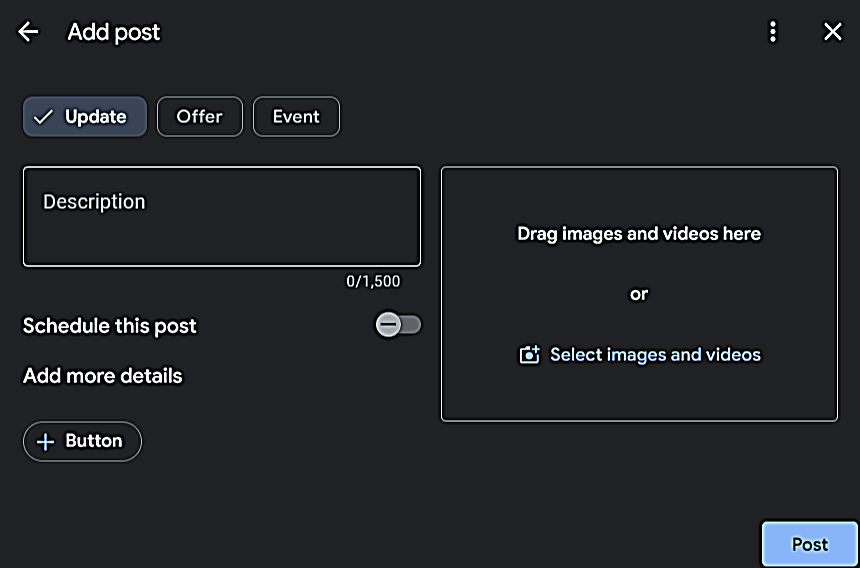 Updates are the most versatile post type and should be your default choice for most content. Updates are the most versatile post type and should be your default choice for most content.
Available Fields for Updates
- Media — Images or video.
- Description — Up to 1,500 characters; the first line functions like the headline.
- Schedule this post — Optional.
- Button — Optional; options include None, Book, Order online, Buy, Learn more, Sign up, Call now.
Media Best Practices
Selection rule: Use one primary (hero) asset whenever possible. If your editor allows multiple uploads, keep it to a small set (such as 1–3) so patients do not have to swipe to understand the point.
What to show: Exterior signage, reception area, operatories without patients, team photos without patients, and comfort cues that are true for the practice. For guidance on building an image library, see dental practice photography.
Common mistakes: Stock photos that feel generic, text-heavy graphics that are unreadable on mobile, and any image where a patient could be identified.
Description Best Practices
Above-the-fold rule: Truncation varies by device and surface. Write as if only the first 1–2 lines will be seen without tapping. Put the service and next step up front, then add supporting detail.
Structure:
| • |
Line 1 — Mirror the intent (“Tooth pain and swelling can feel urgent.”).
|
| • |
Line 2 — Explain what happens next (“When you call, we’ll ask about timing and symptoms.”).
|
| • |
Line 3 — Add reassurance and a boundary (“Recommendations depend on an evaluation and findings.”).
|
| • |
Line 4 (optional) — Add operational truth only if accurate (hours guidance, availability notes). |
Button Selection
Button choice is an operational promise. For more on effective action mechanisms, see best call to actions for dental websites—the same principles apply to GBP posts.
| • |
None — Best for purely informational posts (closure reminders, reassurance) when a button would mismatch.
|
| • |
Call now — Best for urgent triage if phones are reliably answered during posted hours.
|
| • |
Book — Use only if online scheduling is accurate, monitored, and matches the post topic.
|
| • |
Learn more — Best for high-consideration services; send to a matching service page with consistent language.
|
| • |
Sign up — Memberships or newsletters only if the signup is real and simple.
|
| • |
Order online and Buy — Use only for legitimate ecommerce or paid plans the office can fulfill. |
Common Update Mistakes
| • |
Mismatched buttons — Book used when the booking flow cannot schedule that service or timeframe.
|
| • |
Operational drift — Posting about hours or availability that changes without a review step.
|
| • |
Overly broad topics — Listing every service instead of one intent and one next step.
|
| • |
Risky claims — Implied guarantees about pain, speed, or outcomes. |
Key takeaway: For Updates, the first line is the headline, and the button is the operational promise.
> Back to Table of Contents
Offer Posts: Field-by-Field Best Practices
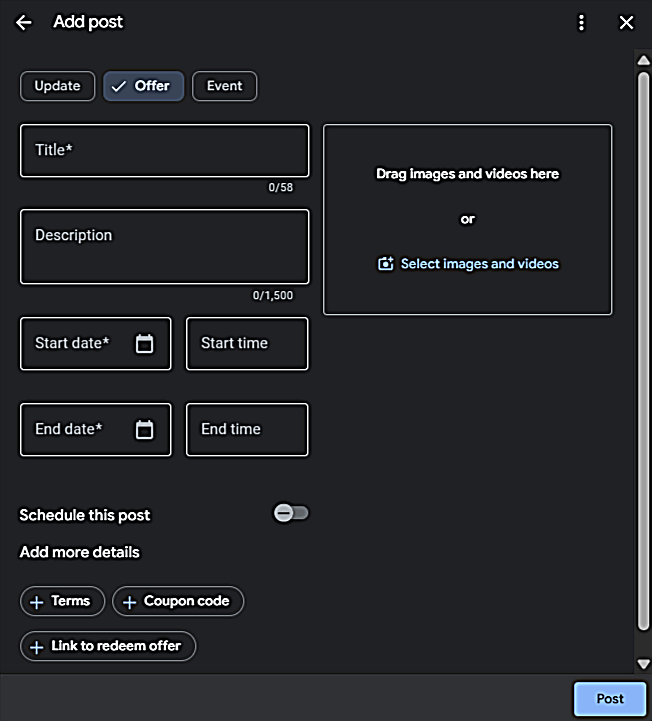 Offer posts are for precise promotions that can be honored exactly as written. They work when the office can support the terms, timing, and call flow. Offer posts are for precise promotions that can be honored exactly as written. They work when the office can support the terms, timing, and call flow.
Available Fields for Offers
- Media — Images or video.
- Title — 58-character limit shown in many editors; keep it brief and literal.
- Description — Up to 1,500 characters.
- Start date and end date — Required; times are recommended to prevent confusion.
- Schedule this post — Optional.
- Terms — Space for conditions and clarity.
- Coupon code — Optional.
- Link to redeem offer (Offer URL) — Recommended; the destination should match the offer and be trackable.
Title Best Practices
Above-the-fold rule: Write the title so a patient understands it without opening the post.
| • |
Offer first, qualifiers second — Clarity before detail.
|
| • |
Avoid hype and pressure language — Skip superlatives and urgency phrasing.
|
| • |
Avoid clinical promises — No guaranteed outcomes, speed claims, or “pain-free” guarantees. |
Example titles: “New Patient Exam + X-Rays (New Patients)” — “Membership Plan: Preventive Visits Included” — “Clear Aligner Consult: What to Expect”
Terms Best Practices
Write Terms as short, scannable bullets. Make the first bullet the eligibility rule.
Terms checklist:
| • |
Eligibility — New patients only, age limits, membership conditions if applicable.
|
| • |
Included items — What is covered at a high level.
|
| • |
Exclusions — What is not included or what may require evaluation.
|
| • |
Redemption steps — How to use the offer and where to mention a code.
|
| • |
Expiration and limitations — End date, one per patient, cannot combine, etc.
|
| • |
Clinical boundary — “Treatment recommendations depend on evaluation and findings.” |
Link to Redeem Offer
Offers do not use the same button selector as Updates and Events. Google may show a built-in View offer action, and your Link to redeem offer and Terms populate the offer details.
| • |
Use a dedicated landing page — Repeat the offer and terms consistently, without bait-and-switch.
|
| • |
Match staff reality — The office should honor the offer exactly as written, or the offer should not be posted.
|
| • |
Use UTMs — Track offer traffic and behavior in analytics. |
Common Offer Mistakes
| • |
Unreadable terms — Conditions exist but are buried in paragraphs or unclear language.
|
| • |
Mismatched landing pages — The destination does not reflect the post details.
|
| • |
Pressure language — Urgency phrasing that raises skepticism and complaints.
|
| • |
Hidden constraints — Promoting an offer the office cannot support with staffing or scheduling. |
Key takeaway: Offers succeed when the details are readable, the terms are honored, and the offer experience matches reality.
> Back to Table of Contents
Event Posts: Field-by-Field Best Practices
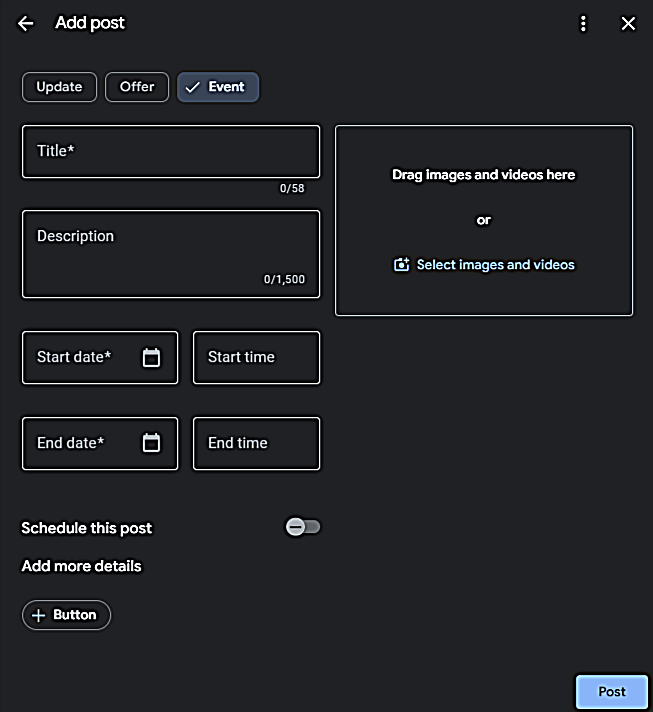 Events are for real date/time items. The primary risk is simple: incorrect dates harm trust quickly. Events are for real date/time items. The primary risk is simple: incorrect dates harm trust quickly.
Available Fields for Events
- Media — Images or video.
- Title — 58-character limit shown in many editors; include what + when.
- Description — Up to 1,500 characters.
- Start date and end date — Required; times are recommended. If you omit times, Google may display the event as an all-day event on those dates.
- Schedule this post — Optional.
- Button — Optional; options include None, Book, Order online, Buy, Learn more, Sign up, Call now.
Title Best Practices
Above-the-fold rule: Write the title so a patient understands it without opening the post.
| • |
Include the event and the timing — Make it scannable at a glance.
|
| • |
Be literal — Avoid clever phrasing that hides the point (especially for closures). |
Example titles: “Office Closed: Labor Day (Mon, Sept 1)” — “Community Dental Day: 10am–2pm” — “Implant Consult Block: Sat, March 8”
Date and Time Best Practices
| • |
Dates are required; times are recommended — Times reduce confusion about when the office is available.
|
| • |
If you omit times — Google may display the event as an all-day event on the selected dates.
|
| • |
Match staffed hours — Use end times that do not encourage calls when nobody is there. |
Lead Time for Scheduling
| • |
Closures — Post 7–14 days ahead, then consider a short Update reminder closer to the date.
|
| • |
Community or limited events — Post 2–4 weeks ahead, then publish an Update reminder the week of. |
Button Selection for Events
| • |
Learn more — Best for event detail pages that include expectations and boundaries.
|
| • |
Sign up — Use only if RSVP/registration is real and quick.
|
| • |
Call now — Good for questions or triage when phones are staffed.
|
| • |
Book — Only if the event is appointment-based with an accurate booking flow.
|
| • |
None — Acceptable for closures when the description already gives the next step. |
Common Event Mistakes
| • |
Incorrect dates — Timing errors reduce trust quickly and create frustration.
|
| • |
Missing next-step guidance — Especially for closures or limited capacity events.
|
| • |
Mismatched buttons — Buttons that lead to dead ends or unavailable options. |
Key takeaway: Events earn trust by being operationally precise, with times added whenever they reduce confusion.
> Back to Table of Contents
Posting Cadence and Scheduling
GBP post longevity and placement can vary by post type and by Google surfaces. In practice, Update posts can remain visible for about six months before being tucked under “previous updates,” while Offers and Events use date ranges. Because visibility is not guaranteed across devices and placements, cadence should be designed around freshness and operational accuracy rather than a strict week-by-week visibility assumption.
Cadence by Office Model
| • |
Solo or small team — One Update per week, plus Events only when needed for closures or real date/time items.
|
| • |
Multi-provider office — One to two posts per week if ownership and approvals are defined.
|
| • |
Multi-location group — One localized Update per location weekly, with unique edits and office-specific availability. For DSO-specific guidance, see DSO marketing structure. |
Topic Rotation Ideas
Rotate through these categories to maintain variety without overthinking:
| • |
Emergency clarity — What to do for sudden pain, broken teeth, lost crowns.
|
| • |
High-consideration services — Implants, orthodontics, cosmetic options.
|
| • |
Hygiene and preventive — Cleanings, exams, why preventive care matters.
|
| • |
Comfort and trust — What a first visit looks like, sedation options, anxiety support. |
Scheduling works best when the office reviews queued posts regularly so hours, staffing, and service availability remain accurate.
Key takeaway: Weekly consistency often delivers the “active and reliable” signal patients look for, even when longevity and placement vary.
> Back to Table of Contents
Tracking and Measurement
GBP post views do not automatically equal calls, but view and action trends can move together over time when posting is consistent and topics match patient intent. The most useful approach blends GBP Insights with trackable links and operational notes from the front desk.
For a deeper look at attribution across channels, see how dentists can track marketing ROI by channel and source.
Three Measurement Layers
| • |
Google Business Profile Insights — Watch trends in calls, website clicks, and direction requests alongside posting cadence.
|
| • |
UTM tagging — Use UTMs for any website-bound destination: Learn more, Book, Sign up, Buy, Order online, and Link to redeem offer.
|
| • |
Call measurement — Call now does not use UTMs; measure via GBP call actions and any compliant call tracking approach, plus front desk tagging such as “Which post did you see?” or “Did you see an offer code?” |
Recommended UTM Pattern
| • |
Source — google
|
| • |
Medium — organic
|
| • |
Campaign — gbp_post
|
| • |
Content — update_[topic]_[monthyear] or offer_[offername]_[monthyear] or event_[eventname]_[monthyear |
]
Key takeaway: Track actions that reflect intent and clarity, not just impressions.
> Back to Table of Contents
HIPAA and Compliance Guardrails
This section is marketing education only and is not legal or medical advice. Rules can vary, so follow internal policies, state board guidance, and consult a compliance officer or attorney when needed. For a deeper dive, see HIPAA compliance for dental marketing.
Common Privacy and Compliance Risks
| • |
Patients visible in photos — Including reflections and background seating areas.
|
| • |
Before-and-after images without documented consent — Especially when faces or unique identifiers are visible.
|
| • |
Captions referencing identifiable stories — Even without names, unique details can identify a person.
|
| • |
Screenshots of messages — DMs, texts, and reminders can contain personal information. |
Language That Creates Liability Risk
| • |
Avoid — “Guaranteed pain-free,” “Permanent fix,” “Results in one visit.”
|
| • |
Use instead — “Options vary by evaluation,” “Comfort planning is available,” “Recommendations depend on findings.”
|
| • |
Avoid — “Perfect smile,” “Best,” “#1.”
|
| • |
Use instead — “Clear explanations,” “Evidence-based recommendations,” “Patient-centered planning.” |
HIPAA-Safe Image Checklist
| 1. |
Confirm no faces, names, charts, or screens are visible.
|
| 2. |
Check reflections and background details carefully.
|
| 3. |
Use documented consent for any identifiable patient content, testimonials, or before-and-after images.
|
| 4. |
Store consent documentation consistently with date and scope.
|
| 5. |
When uncertain, choose an approved “safe category” image instead. |
Key takeaway: Compliance is easiest when the office uses privacy-safe visuals and conditional, evaluation-dependent language.
> Back to Table of Contents
Workflow and Ownership
Posting consistency fails more often from unclear ownership than from a lack of ideas. The best owner is the person closest to daily operations who can keep posts routine and accurate.
Who Should Own Posting
| • |
Office manager — Often strongest fit for cadence and approvals.
|
| • |
Front desk lead — Strong for availability alignment, especially with templates.
|
| • |
Provider input — Best used for clinical boundaries on higher-risk topics (sedation, implants).
|
| • |
Marketing support — Helpful for planning, consistency, and measurement alignment with campaigns. |
GBP posts also benefit when aligned with your intake process—the front desk should know what posts are live so they can match caller expectations. If your front desk process creates friction, even well-crafted posts will underperform.
Recovery After Missed Weeks
| 1. |
Restart with one current Update (one intent, one topic) rather than trying to “catch up.”
|
| 2. |
Avoid posting multiple times quickly just to fill the feed.
|
| 3. |
Maintain weekly cadence for 4 to 6 weeks before changing the system.
|
| 4. |
Use monthly reviews to refine topics based on actions and confusion-call patterns. |
Key takeaway: A simple workflow prevents outdated posts, mismatched actions, and avoidable confusion calls.
> Back to Table of Contents
FAQs
What should dentists post on Google Business Profile?
Focus on posts that answer patients’ unspoken questions: emergency clarity (what to do for sudden pain), new patient expectations (what the first visit looks like), service explanations (what a consult includes), and operational updates (closures, availability). Use Updates for most content, Offers only for precise promotions you can honor exactly, and Events for real date/time items.
How often should a dental office post to Google Business Profile?
Weekly posting is a practical starting point for most offices. Update posts can remain visible for about six months, but weekly cadence signals that the practice is active and reliable. Solo or small teams can aim for one Update per week plus Events as needed for closures. Multi-provider offices may post one to two times per week if ownership and approvals are clear.
Do GBP posts expire after a week?
Placement and visibility vary by post type and by where the post is shown on Google surfaces. In practice, Update posts can remain visible for about six months before being tucked under previous updates, while Offers and Events use date ranges. Plan cadence around freshness and accuracy rather than assuming a strict one-week window.
Should I include a phone number in my GBP post?
It is safer to avoid phone numbers in the post description. Using the profile phone field and the Call now button instead can reduce rejection risk and keeps call routing consistent with the listing.
What is the difference between Update, Offer, and Event posts?
Updates are for education, reassurance, and general information—they are the default choice for most content. Offers are for precise promotions with clear terms and eligibility that the office can honor exactly as written. Events are for anything with a real date and time anchor, such as closures, community days, or limited consult blocks. Each post type has different available fields.
Do Update posts have a title field?
Updates commonly do not include a separate title field in the editor, so the first line of the description should function like the headline. Front-load the main message and next step in the first 1–2 lines because truncation varies by device and placement.
Which button should I use on a GBP post?
Button choice is an operational promise. Many offices rely on Call now for urgent triage, Learn more for high-consideration services, and Book only when online scheduling is accurate and monitored. If a button would confuse a dental patient or create a dead end, it is better not to use it. Offers do not use the same button selector—they use Link to redeem offer and Terms instead.
How do I track whether GBP posts are working?
Combine three measurement layers: Google Business Profile Insights for trends in calls, clicks, and direction requests; UTM tagging for any website-bound buttons or links; and front desk tagging to note when callers mention seeing a post or offer code. Track actions that reflect intent and clarity, not just impressions.
How We Help Practices Build a Posting System
A posting system becomes sustainable when it is treated like an operational habit, not a creative project. Resistance usually comes from time pressure, fear of mistakes, or uncertainty about what to say. Templates, an approved image library, and a 30-second QA checklist reduce all three.
One practical way to keep GBP posts aligned with broader marketing is to connect topics to the same service themes used on service pages and educational content so patients see consistent language across touchpoints. GBP posting works best as part of a complete dental marketing strategy that includes SEO, reputation management, and consistent website messaging.
Our dental marketing experts at WEO Media - Dental Marketing typically see the best results when the office keeps one owner accountable for weekly posting, uses a small rotation of patient-intent topics, and audits the last month of posts for accuracy and clarity before scaling frequency.
Key takeaway: The most effective GBP posting programs are calm, accurate, and repeatable—patients feel safer calling when posts answer unspoken questions and set clear expectations. |
|





